
Honestly prior to the recent firmware update it would randomly disconnect while playing a game, but now it's great for typing (as I am this post) and games including the emulators, with a large choice of keys to map. When typing, due to the size of mine, the experience is similar to texting, so it isn't at all hard to use.supergman25 wrote:Darklust and ArchosLibrarian...how do u like those keyboards?
Mini bluetooth keyboard
Re: Mini bluetooth keyboard
Re: Mini bluetooth keyboard
can you control video selection - network folder and film when HDMI out to TV is being used ? (i.e. can you use it as a remote )
thanks - Stephen
thanks - Stephen
Thanks
- Stephen
- Stephen
Re: Mini bluetooth keyboard
Absolutely; the device still broadcasts bluetooth even while in video-out. I have the 101 model, and I have no problem controlling it from a distance.stephen44 wrote:can you control video selection - network folder and film when HDMI out to TV is being used ? (i.e. can you use it as a remote )
thanks - Stephen
-
supergman25
- Archos User

- Posts: 85
- Joined: Fri Nov 26, 2010 10:09 pm
Re: Mini bluetooth keyboard
thanks. i ordered one!Darklust wrote:Honestly prior to the recent firmware update it would randomly disconnect while playing a game, but now it's great for typing (as I am this post) and games including the emulators, with a large choice of keys to map. When typing, due to the size of mine, the experience is similar to texting, so it isn't at all hard to use.supergman25 wrote:Darklust and ArchosLibrarian...how do u like those keyboards?
-
supergman25
- Archos User
- Posts: 85
- Joined: Fri Nov 26, 2010 10:09 pm
Re: Mini bluetooth keyboard
keyboard came today...works extremely well! took a few mins to figure out how to pair it..but once paired..all the little shortcut buttons work. i really like that. BUT
i overlooked one large thing...and that is my main use is to use it in class. its just something im not comfortable typing on it for notes/papers. so im selling it to an ipad user. and i bought this..
http://cgi.ebay.com/ws/eBayISAPI.dll?Vi ... 422wt_1137
reason. i will put it inside a double CD case along with 101. unzip. pup up stand. type away.
i overlooked one large thing...and that is my main use is to use it in class. its just something im not comfortable typing on it for notes/papers. so im selling it to an ipad user. and i bought this..
http://cgi.ebay.com/ws/eBayISAPI.dll?Vi ... 422wt_1137
reason. i will put it inside a double CD case along with 101. unzip. pup up stand. type away.
-
Vespernova7
- Archos User
- Posts: 66
- Joined: Thu Dec 23, 2010 3:02 am
Re: Mini bluetooth keyboard
yeah but that's for cell phones, I don't see it working with a keyboard.weedahoe wrote:That seems to be the issue with a lot of BT devices and Archos - "paired but not connected"
http://forum.archosfans.com/viewtopic.php?f=74&t=43001
try using these steps in this link
to get the keyboard what you should do is when you set it to pain and it sugest typeing in 0000 or 1234
put in ether one on the device and then type the same thing on the keyboard and hit enter. that's how I got it to work with my ipaq bluetooth keyboard which is not designed to work with android but it works regardless
Re: Mini bluetooth keyboard
How are you connecting that to your Archos? Does the 101 have a normal USB port?supergman25 wrote:keyboard came today...works extremely well! took a few mins to figure out how to pair it..but once paired..all the little shortcut buttons work. i really like that. BUT
i overlooked one large thing...and that is my main use is to use it in class. its just something im not comfortable typing on it for notes/papers. so im selling it to an ipad user. and i bought this..
http://cgi.ebay.com/ws/eBayISAPI.dll?Vi ... 422wt_1137
reason. i will put it inside a double CD case along with 101. unzip. pup up stand. type away.
Re: Mini bluetooth keyboard
New here - not the greatest techie - but I got the Archos 70 250GB and I ordered this keyboard - paired fine adn all but while watching video through the HDMI out to the tv I can't get the Play, Pause, Rewind, FF buttons to work, the sound buttons work - is there something I need to do to make this work or is it a nonfunctioning aspect of the keyboard?Darklust wrote:
Where my index finger is would be the location of the indicator LEDs with the pairing button closest to my finger.

Re: Mini bluetooth keyboard
I just got this bluetooth keyboard.
http://www.adesso.com/en/whats-new/new- ... 000bb.html
I had to use the same method to pair that a lot of you mentioned above, type a pairing code into my 101, and then type the same code into the keyboard and hit enter. After that it paired right away.
The keyboard is pretty big, a lot closer to a full size keyboard, but it's really nice for SSH and remote desktop sessions, which I use a lot.
The touchpad is working really well too. The only thing I haven't quite figured out yet is if there is a way I can long press with either the keyboard or touchpad. Can anyone longpress with any of their other keyboards?
I've tried a lot of different variations of holding buttons and clicking, just haven't figured out anything that works yet.
http://www.adesso.com/en/whats-new/new- ... 000bb.html
I had to use the same method to pair that a lot of you mentioned above, type a pairing code into my 101, and then type the same code into the keyboard and hit enter. After that it paired right away.
The keyboard is pretty big, a lot closer to a full size keyboard, but it's really nice for SSH and remote desktop sessions, which I use a lot.
The touchpad is working really well too. The only thing I haven't quite figured out yet is if there is a way I can long press with either the keyboard or touchpad. Can anyone longpress with any of their other keyboards?
I've tried a lot of different variations of holding buttons and clicking, just haven't figured out anything that works yet.
-
archoslibrarian
- Archos Novice

- Posts: 6
- Joined: Mon Dec 13, 2010 12:04 am
Re: Mini bluetooth keyboard
Supergman25, I have the same question as Xeraux, how do you attach a usb keyboard to the archos? The keyboard has a fullsize usb, the archos does not. I want to attach a wired keyboard to my archos, but not sure what to order.
Anybody know?
Anybody know?
-
bsoplinger
- Archos Guru

- Posts: 302
- Joined: Sat Dec 25, 2010 8:37 am
Re: Mini bluetooth keyboard
Yikes! At $129 that's over half what I paid for my 101 tablet.zigbee wrote:I just got this bluetooth keyboard.
http://www.adesso.com/en/whats-new/new- ... 000bb.html
Re: Mini bluetooth keyboard
Yeah I know. The only reason I went with that one was because I had $100 gift card for best buy and it was the only bluetooth keyboard I could find at all on their site.bsoplinger wrote:Yikes! At $129 that's over half what I paid for my 101 tablet.zigbee wrote:I just got this bluetooth keyboard.
http://www.adesso.com/en/whats-new/new- ... 000bb.html
I'm gonna need to find a smaller one too that I can get that will fit in a carrying case because that one is too big for that.
Just to throw this out there again, anyone have any idea how to use a keyboard/touchpad combo like that to do a long press? That's the one thing I have not figured out yet that would be really useful.
-
AllenPapapetrou
- Archos Guru
- Posts: 5191
- Joined: Sat Sep 20, 2008 10:52 am
- Location: Hanapepe, HI
Re: Mini bluetooth keyboard
I do....zigbee wrote: Just to throw this out there again, anyone have any idea how to use a keyboard/touchpad combo like that to do a long press? That's the one thing I have not figured out yet that would be really useful.
I have two BT KB/TP: 1) The ProMini and 2) The SolidTek. Both function the same way.
1. The ProMini from Amazon is the Rii Mini with some stickers on the box:

2. The SolidTek from Amazon:
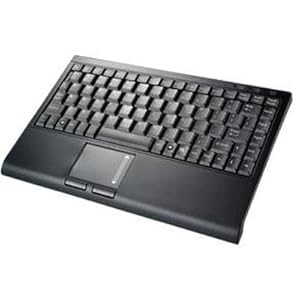
Left Mouse Button Selection/Activation:
The Left Mouse button requires two taps to activate a process.
- The first tap Selects the UI Component
The second tap Activates the Component.
To Activate the Home button of the Android buttons:
- 1. Move Pointer over the Home button
2. Double tap the Left Mouse button
Long Press:
To do a Long Press:
- 1. Tap the Left Mouse button to Select the UI Component
2. Press the Left Mouse button until the Long Press process initiates
1. Bring up Add to Home screen Menu:
- - Move Mouse Pointer to free area of Home Screen
- Tap the Left Mouse button
- Press the Left Mouse button until menu appears
- - Move the Mouse Pointer to the Notification Bar
- Tap the Left Mouse button
- Press the Left Mouse button
- When the Bottom of the Notification Message area appears:- - Drag Down on the Touchpad until the Bottom is at the bottom of the screen
- Let go of the Left Mouse button
- - Drag Down on the Touchpad until the Bottom is at the bottom of the screen
Allen
-An old geek 
5IT|A70S|A101
5IT|A70S|A101
Re: Mini bluetooth keyboard
Thanks, that works perfectly with my keyboard. The keyboard you got from Amazon looks pretty nice. I think I'm going to order one of those for my travel case, this Adesso works well but it's too big for my carrying case.AllenPapapetrou wrote:
Long Press:
To do a Long Press:I've had the SolidTek since August. The ProMini came in today. I made sure they functioned the same for Long Press, then wrote this post.
- 1. Tap the Left Mouse button to Select the UI Component
2. Press the Left Mouse button until the Long Press process initiates
Allen
-
bsoplinger
- Archos Guru
- Posts: 302
- Joined: Sat Dec 25, 2010 8:37 am
Re: Mini bluetooth keyboard
I got this keyboard since having a small mouse/touchpad along with a keyboard seemed like a good idea to me.AllenPapapetrou wrote: 1. The ProMini from Amazon is the Rii Mini with some stickers on the box:
Trouble is the manual talks about an android.apk file from the mini CD in the box but there isn't such a thing. Just Windows Mobile drivers and Nokia drivers.
Does the touchpad work on the 101 if I just connect it via Bluetooth? What about the keyboard itself?
TIA
Brian
-
AllenPapapetrou
- Archos Guru
- Posts: 5191
- Joined: Sat Sep 20, 2008 10:52 am
- Location: Hanapepe, HI
Re: Mini bluetooth keyboard
See my replies below in Red:
Allen
Allen
bsoplinger wrote:I got this keyboard since having a small mouse/touchpad along with a keyboard seemed like a good idea to me.AllenPapapetrou wrote: 1. The ProMini from Amazon is the Rii Mini with some stickers on the box:
Trouble is the manual talks about an android.apk file from the mini CD in the box but there isn't such a thing. Just Windows Mobile drivers and Nokia drivers.
The apk file wasn't included because it isn't needed.
Does the touchpad work on the 101 if I just connect it via Bluetooth?
Yes.
What about the keyboard itself?
Yes, however this keyboard like some others has the arrow axes flipped.
TIA
Brian
-An old geek
5IT|A70S|A101
5IT|A70S|A101