
I just dug out an old EMTAC S3 BTGPS receiver I bought years ago for an old Palm Treo 650. I haven't used it in ages since I had later bought an HTC (AT&T) Tilt that had a built in GPS w/Win Mobile and later a Moto Backflip with android and GPS. Charged it up, set the 101 to scan for BT devices, found the GPS and paired with it.
I get the same message on the 101 that I get when I try to tether it via BT "Paired but not connected".
However, I started up Google Maps 5 and it connected to the BTGPS and it is giving accurate satellite fixes to Google maps. There is a new status icon on the 1010 I haven't seen before that is think is supposed to be a dish antenna with a couple of green semicircles indicated signal strength or connecting status (not unlike the wifi symbol).
Can't tell if the status in the wireless section has changed from paired but not connected to connected because when I try to get to the setting screen it leaves google maps and then the satellite dish icon goes away before I can read the settings screens.
Anyway, if an old gps (vintage 2004/2005) like the emtac can hook up to the archos via bluetooth, then I imagine most new ones should be able to as long as they support NMEA standards.
Now if i could only get beyond "paired but not connected" between the 101 and my backflip android phone so that I could run data through it like i can with my win-7 PC, I'd be in FAT CITY.
GPS. Hope it works.
Re: GPS. Hope it works.
AWESOME !!
What apps would you recommend that I use to make it read the GPS on my Droid Incredible?
Thanks !
What apps would you recommend that I use to make it read the GPS on my Droid Incredible?
Thanks !
Re: GPS. Hope it works.
KB3MMX wrote:AWESOME !!
What apps would you recommend that I use to make it read the GPS on my Droid Incredible?
Thanks !
the first app i downloaded from the market to test the emtac GPS was GPS Status V3.6 . When i was satisfied that raw gps was working over bluetooth I then pulled down google maps version 5. those seem like to benchmark tools that you can use to verify the datastream. I think the the trick will be to get it paired with the droid and i'm not sure how that would work.
Re: GPS. Hope it works.
ok, i got the gps to work on the dinc as a provider and have used a couple gps programs successfully on the archos 101 but google maps still doesnt show up in the market for some reason...weird.
Any suggestions?
Any suggestions?
-
Hajile_Ibushi
- Archos Guru

- Posts: 965
- Joined: Sun Oct 17, 2010 6:40 am
- Location: Southern Tagalog, Philippines
Re: GPS. Hope it works.
Google maps is included in the google market. Or atleast it was in the old one. They decided not to include it in the new one?
-
slvrscoobie
- Archos Novice

- Posts: 36
- Joined: Mon Nov 08, 2010 7:48 pm
Re: GPS. Hope it works.
anyone gotten BT GPS From the phone PLUS data over BT?
3g Hotspot kills BT, so i cant use both that way. But I cant seem to tether via BT PAn + BT2GPS at the same time. Should I be able to?
3g Hotspot kills BT, so i cant use both that way. But I cant seem to tether via BT PAn + BT2GPS at the same time. Should I be able to?
Re: GPS. Hope it works.
Anyone ever tried other navigation apps other than google map? I've plan to purchase a BT GPS receiver but since I live in Asia and Google turn by turn navigation doesn't work outside of US so I was wondering whether there are any other apps that support the external GPS.
-
Hajile_Ibushi
- Archos Guru
- Posts: 965
- Joined: Sun Oct 17, 2010 6:40 am
- Location: Southern Tagalog, Philippines
Re: GPS. Hope it works.
Same here. I live in the Philippines and unfortunately, the only one with turn by turn for Manila seems to be Nokia.luthv wrote:Anyone ever tried other navigation apps other than google map? I've plan to purchase a BT GPS receiver but since I live in Asia and Google turn by turn navigation doesn't work outside of US so I was wondering whether there are any other apps that support the external GPS.
When is google going to add turn by turn support for our maps?
Re: GPS. Hope it works.
I've found NDrive v10 to be working quite well, other gps app that I've tried but with little success are papago, navitel, sygic mobile map. Sygic actually came close but it cannot detect archos device code for map activation.Hajile_Ibushi wrote: Same here. I live in the Philippines and unfortunately, the only one with turn by turn for Manila seems to be Nokia.
When is google going to add turn by turn support for our maps?

Re: GPS. Hope it works.
I have plan to order this GPS Receiver i-Blue 737 A+
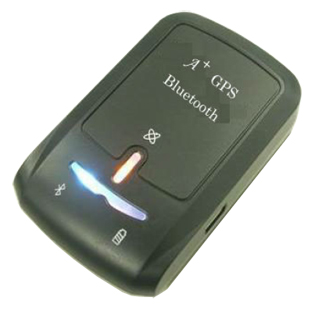
http://lhc4u.com/product_info.php?produ ... 10648ac2c9
In Thailand cost just only 2,600 Bath ($78.24) and hope it work fine with my A101IT
Have anyone ever use it.?
http://lhc4u.com/product_info.php?produ ... 10648ac2c9
In Thailand cost just only 2,600 Bath ($78.24) and hope it work fine with my A101IT
Have anyone ever use it.?
ARCHOS101-16GB/16GB MicroSD-2.3.20
Re: GPS. Hope it works.
I have an older model, the i-Blue 737, which I originally bought for use with another device. It pairs just fine with my A70, and I've used it successfully with Google Maps, Google Tracks, and c:geo (geocaching app). Hopefully the newer model will work just as well or better!jakkrith wrote:I have plan to order this GPS Receiver i-Blue 737 A+
(. . . snip)
Have anyone ever use it.?
A70S@1GHz - rooted 2.1.08 - Zeam
Re: GPS. Hope it works.
I got a bluetooth gps globalsat off ebay and it is turning out to be a crappy buy. the globalsat bt gps ($18) i got had only 20 min battery charge (even after wall charging for 8 hours). the gps worked for 5 mins, and archos was able to beautifully navigate with Google Navigate and bt gps stopped sending signals. I knew i had nice GPS signal as my iphone 3GS Navigon and Garmin Nuvi were routing cleanly. Anyway after lot of test I found the receiver is not working as I expected and now I have ordered a new one from amazon, the more expensive one.
i think ebay purchases are a luck, i had no issues so far in past 8 years from ebay,
i think ebay purchases are a luck, i had no issues so far in past 8 years from ebay,
Archos 70review http://goo.gl/pUsDy
Re: GPS. Hope it works.
IDK, Google maps doesn't show up at all in the market....getting frustratedHajile_Ibushi wrote:Google maps is included in the google market. Or atleast it was in the old one. They decided not to include it in the new one?
I have tried clearing cache and data, so far neither has helped.
Re: GPS. Hope it works.
I had bought copilot on my phone.. works fine. I tried to install it on my tablet but it wouldn't authenticate. I wanted to purchase it for my A70, but the $5 deal is only for one device.. I called tech support and was told the way to get a second license for Android was to buy it online via the windows app link (29$) and get a key.. This is an apk download.. you dont install the one via the market. Once I installed it I was able to use the key to activate it and was good to go.. I paid the extra money because there really isn't anything else available that is as complete with a true offline mode - I downloaded the entire US maps on my tablet. No data connection is ever required. (google maps has ability to cache maps up for when travelling and hitting dead spots where the data connection drops.. but it is not a true offline mode)..675 Trip wrote:I figured it was time to spend $5 on copilot.
Every time I tried purchasing through A101, it wouldn't complete the authorization
I purchased it on my phone because website says you can transfer it from one android to another by deactivating the first.
I didn't start (or complete) the reg on my phone and tried to do it on the tablet. I got trial expired messages.
my phone started giving low memory warning so I deleted copilot through applications (not market because I didn't want to cancel order) it canceled it anyway.
I went back to tablet and tried again and still no luck, so I bought it on phone (no refund now) installed it all the way, dl'd small local map and then tried to deactivate - can't greyed out.
I contact support re: can't deactivate and their professional response is - we don't support archos tablets, here's a link to the 3 supported devices - bubbye - paraphrased.
I have read elsewhere that they are a little retarded on their licensing and it takes days to activate a purchase, so I am hoping that is the answer and once it is fully active, I can deactivate it and install on tablet.
Has anyone been successful installing on A101 tablet?
Together with my $18 globalsat bt-359, I have a fabulous package for trips. It has really been great.
-
bsoplinger
- Archos Guru
- Posts: 302
- Joined: Sat Dec 25, 2010 8:37 am
Re: GPS. Hope it works.
The support person just told me to make another Google Id. Its a PIA to change the email associated with my Archos but once I did that it was another 5 bucks and the typical 3 day wait for the license code to work and I was all set. I now have Copilot on both my 101 and 5IT.
Re: GPS. Hope it works.
bsoplinger wrote:The support person just told me to make another Google Id. Its a PIA to change the email associated with my Archos but once I did that it was another 5 bucks and the typical 3 day wait for the license code to work and I was all set. I now have Copilot on both my 101 and 5IT.
Ah yes I should have stated that I didnt want to create another Google account for the tablet.
Re: GPS. Hope it works.
Another plus for Copilot. I had hard time getting it working partly because I did a firmware upgrade before it authenicated. But I worked with customer support for several days and they had me run some fixes and got it working. Only $5 for US only. There are other options for other areas but pricing is different.